KPI managment
Manage KPIs in PulseOps BI following the steps below:
- Log in to PulseOps BI as Admin/SuperAdmin.
- From the Menu bar select KPIs
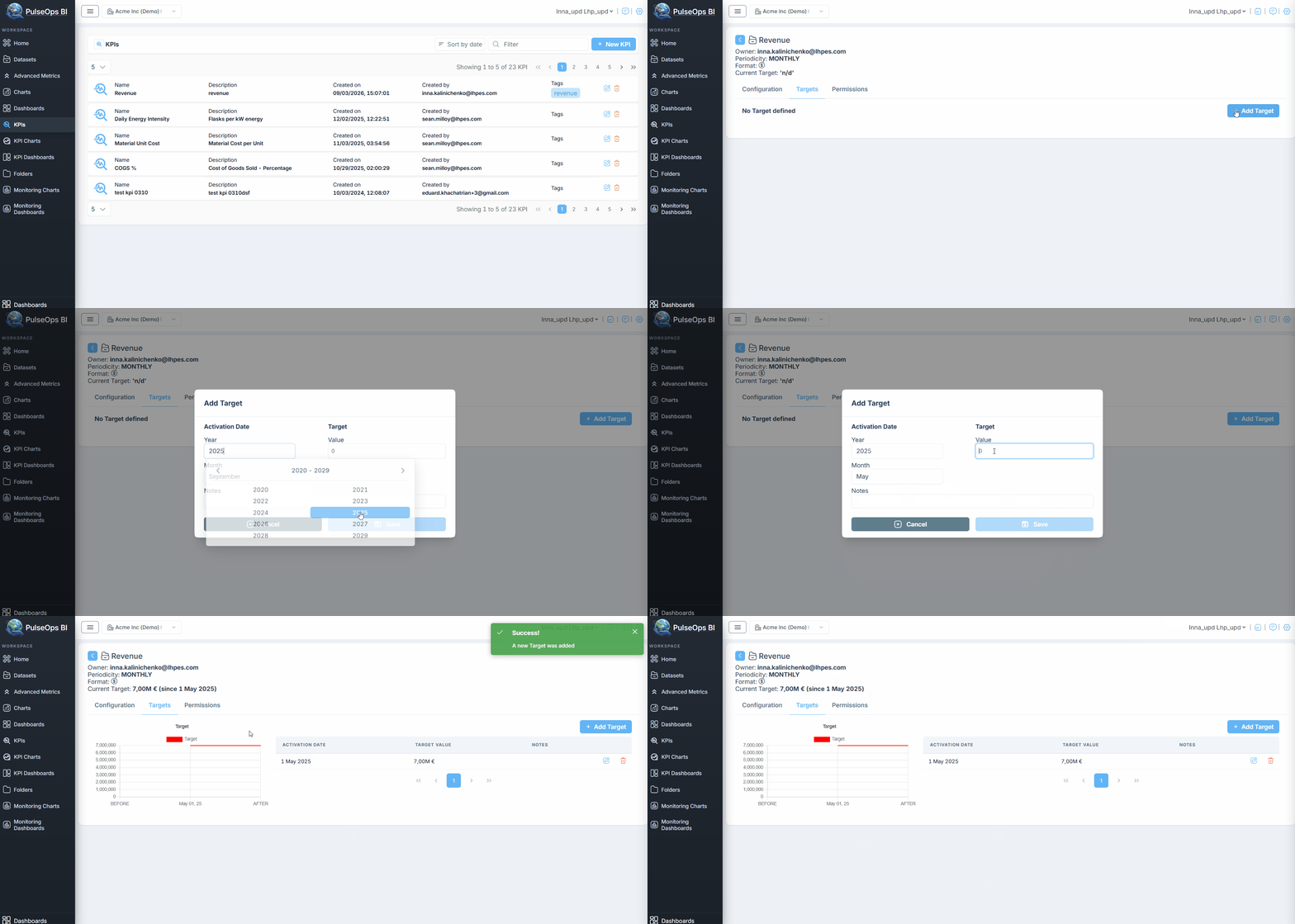
Add Target
- Click the Edit button

- KPI page opens
- Select the Targets tab
- Click + Add Target button
- Add Target modal window opens
- Fill the fields with the respective informations
- Click the Save button to save the new KPI target
Update/Delete Target
You can update or delete a target by clicking the Edit or Delete button, respectively.
Add Permission
- Click the Edit button
- The KPI page opens
- Select the Permission tab
- Click + New Group Permission button to add permission to a group or + New User Permission to add permission to a user
Update a KPI
- Click the Edit button
- The KPI page opens
- Select the Configuration tab
- Apply the desired changes
- Click Update KPI
- The KPI is successfully updated and displayed in KPIs list
Delete a KPI
- Click the Delete button
- A confirmation message appears, click on YES
- The KPI is successfully deleted